-->
≡
Home
Woman
Sport
Business
Health
Privacy Policy
Contact Us
Contact Us
How to Shoot 360 Video (10 Tips)
:
:
2017-06-08T04:28:14Z
Thursday, 8 Jun 2017 - 04:28 AM
For the last few months, I’ve been filming in 360, and trying to get my head around the
new techniques and mindset that’s needed for a camera that sees everything.
And so i’ve put together this list of ten tips that serve as an introduction to the
world of 360 video.
Number ten: the equipment does matter I’m usually the first to say that it doesn’t
matter what you shoot with, but when it comes to 360, there are some essentials.
For example, this was filmed on a regular tripod, and that’s quite obvious if you
look down.
whereas if we take a hi hat, and attach a monopod then it looks like this which is a
lot more manageable.
We could even put the camera on a cheap light stand to get a similar result.
Another essential is a mini-ball head, and i’ll explain why in a minute.
Now, as for the camera, naturally that depends on budget - you can go for the 40 thousand
nokia, or the affordable ricoh theta, and obviously one of those will be of a higher
quality than the other.
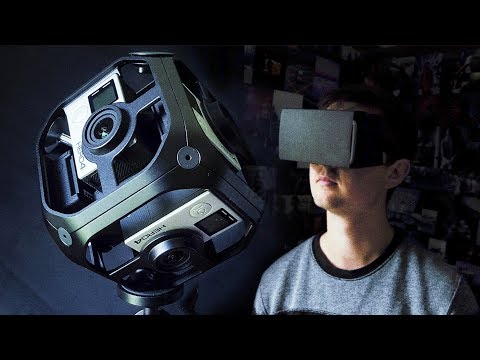
But I’m using something more mid-range - the GoPro omni.
Now full disclosure, GoPro did send me this to use for the video, as part of the omni
all inclusive which has the omni rig, and all the basic accessories including software,
but they have not told me what to say, or had any other involvement in this video.
Now the last thing I want to say is that these tips apply to any 360 camera, not just the
gopro.
Okay tip number nine: the camera is the audience We have to consider that watching a 360 video
is a completely different experience to regular viewing.
Rather than being shown a series of different angles that draw our attention to different
things, it’s literally as if the viewer is in the room, looking around.
So most of the time, we’ll probably want the camera to be at average human height,
which is about 5ft 7.
But the height isn’t the only thing to think about - in regular filmmaking you can cut
to a close up of someone, and it feels kinda intimate, but in 360 if you get someone really
close to the camera, it’s like someone’s invading your personal space, it’s really
uncomfortable.
And if we want to hold the camera handheld, that can cause two problems, firstly it might
be shaky, which could feel like an earthquake for the viewer, not to mention that it’s
a bit odd to be carried around by one hand.
Then there’s editing - a lot of people go for long takes in 360 since fast montages
are probably even more jarring than in regular videos.
Now of course we might want that, we might actually choose to break all of these guidelines,
but it’s certainly worth thinking about the fact that the audience kind of is the
camera, the camera is the audience.
Tip number eight - be careful with seam lines Now 360 cameras at the moment use anything
from two lenses to six in the GoPro, or even more in the most expensive ones, and they
then take those files and join them into a video that covers all angles.
But whenever you’re joining footage, there’s a risk of things not lining up.
And the best way to demonstrate this is with our own two eyes - if you hold up your hand
in front of your face, then you can kind of see through it a bit, and then if you actually
focus on your hand, then what's in the background suddenly becomes double vision, your eyes
cross.
All of that is because our left eye is spaced apart from our right eye so it sees a slightly
different angle.
And so in the same way, with 360 cameras, when you get too close to them, there’s
a risk that either things in background won’t line up, or the foreground won’t.
So how do we avoid this?
Well firstly, we can just avoid getting too close - the further you are from the camera,
the less issues you’ll have.
And secondly, let’s say I was filming myself, I could stand here, and i’ll have three
different lenses filming me at the same time which is gonna cause some issues when they
get combined, so it’d be much to reposition the camera with the ball head so that I have
just one lens on me, and now it looks normal.
So the short answer is avoid getting too close, and when you do, adjust the ball-head so that
none of the important things are on the edges.
Tip number seven, the camera sees all Now this one is pretty obvious, but it has
more implications than you might expect.
Firstly is sound - if you have someone standing there with a boom pole recording audio, they’ll
be very visible.
So our options are either to use the built in mics which obviously aren’t great, or
to hide microphones - most common would be to clip a lavalier under people’s clothes
to catch the dialog.
The same goes for lighting, you can’t hide big lights behind the camera like normal,
so we can either shoot in natural light or carefully hide the lights behind door ways
and stuff.
Small, little LEDs that are battery powered are an obvious choice.
And lastly, you might need to hide people or equipment.
When I was shooting parkour with my cousin in texas, I was hiding behind this wall so
I could see what was happening without being in the shot.
Same thing at the ice rink: we were literally sitting and using the remote to trigger the
recording, and change all of the settings.
Number six, learn to process the footage Now there are already plenty of great in-depth
tutorials about dealing with the footage, so my recommendation is to just watch those
to learn how to use the stitching software - with GoPro it’s called Autopano Video
Pro , and as usual, post production is a lot easier when get things right on set.
Number five: Consider where the audience will look.
Unlike regular filmmaking, we can’t actually force the audience to look where we want them
to look, so how do we avoid the audience just completely missing the important parts?
Well, we can actually use some of the same techniques that filmmakers have been using
for decade on traditional films, like how our eyes will generally be attracted to movement
rather than things that are standing still, or even more so audio cues, like if someone
is speaking, we’ll usually look at them.
So it’s our responsibility to get the viewers attention and hold onto it, because if we
have six things happening at the same time, then the audience will just switch between
them and definitely miss something.
I think the best way to get in the right mindset is to watch other videos in 360 which you
can do on a smartphone like this, or for the full experience you can get a cheap cardboard
holder for your phone.
The goal is to notice what gets our attention, and where we tend to look - then we can watch
our own projects and test them out with other people.
GoPro also have some free software for watching VR videos on a computer, so we don’t have
to use a phone for every single version of the edit.
Number four - Use your camera as an investment There’s no avoiding that a lot of these
360 cameras are quite expensive , cos it’s still relatively new technology.
But what that does mean is that it’s an opportunity for people who do own these cameras
and know how to use them, they can actually get a lot of opportunities for freelance work,
everything from basic event coverage to some really kinda groundbreaking projects.
You could rent it out to other filmmakers, you could even include yourself on set as
the 360 specialist.
The way I see it, either rent a 360 camera when you need one, or buy one and rent it
out to other people.
Number 3.
Question the 360.
This one is very important, whenever there’s new technology, it’s always tempting to
use it too much.
We’ve already established that there are a lot of extra things to think about when
we’re shooting 360, so if I am gonna use it for a project, I wanna make sure it’s
worth it, and it’s not just like a gimmick.
For me that means asking the question: “does the 360 aspect add anything?
“ If the viewer would be looking straight ahead
for most of the video, why not just use a regular camera?
And would it be more effective to make use of traditional camerawork and editing to show
the audience exactly what we want them to see?
Sometimes the answer will be yes, sometimes no - but it’s well worth asking the question.
Number 2: Make use of the medium Right now, we’re in the stage with 360 where
people are still figuring out how to make the most out of this new format, finding the
content that best suits it.
And so far I think the main benefit is immersion.
You know sometimes you come out the cinema and it’s a bit disorientating like you're
waking up from a dream?
Well that kinda happens every single time you take off those goggles.
So with that in mind it’s hardly surprising that these cameras are being used for news
and documentaries in war zones, to give people an understanding of what it’s really like
to be there.
Likewise travel videos are an obvious choice, since they’re so visual and focused on location.
And then of course horror - it makes the most of that immersion to make you jump out of
your skin - but these are the obvious ones, we’re only just getting started.
Cos tip number one is to tell stories.
Now it goes without saying that this medium has huge potential for narrative storytelling,
and so I was like yeah i’m sure I could come up with a short film idea that incorporates
the 360 format, but it’s actually a lot harder than I thought it was gonna be.
Like, should the other characters address the camera?
And how do you write that so that it’s not awkward?
Now is the camera gonna move?
And if it is gonna move, the how are you gonna move it without any people being seen in the
shot?
The point is that anyone can set up a 360 camera and document things, but to actually
go further than that and tell a story, takes a lot more thought it actually requires us
to pretty much forget everything we know about traditional camerawork and editing.
I know there are people out there right now who are pioneering this new format of storytelling
and while may not ever replace traditional filmmaking, the potential is huge.
My name’s Simon Cade, this has been DSLRguide and i’ll see you next week.
By the way, if you’d like to see the footage that I shot for this episode in true 360 format,
click on the screen now or on the link in the description.
Facebook
Twitter
Google Plus
DSLRguide
Latest Posts