-->
≡
Home
Woman
Sport
Business
Health
Privacy Policy
Contact Us
Contact Us
How to Create a Path Profile in MLinkPlanner 1.2
:
:
2018-04-13T07:43:24Z
Friday, 13 Apr 2018 - 07:43 AM
Watch the video
click to begin
Youtube
When sites have been created, you can create microwave point-to-point or point-to-multipoint
hops.
In this video I'll show how to create a path profile for the point-to-point link, for point-to-multipoint
links, the path profile is created in a similar way in the Point-to-multipoint tab.
Go to the Point-to-point tab and specify the start and end of each hop by right-clicking
the relevant item from a drop-down list.
To select a hop, click on the corresponding row in the table.
To navigate hops up and down the table, use the and buttons.
To remove a hop, click . If you click on the hop, it will display in
the center of the basemap.
Path profile properties and equipment parameters for the selected hop are displayed below the
hop table.
Above the right part of the main panel, you can see the following buttons:
Map View: the primary mode in which you can switch hops, create path profiles and enter
equipment parameters for each hop, as well as calculate antenna installation heights.
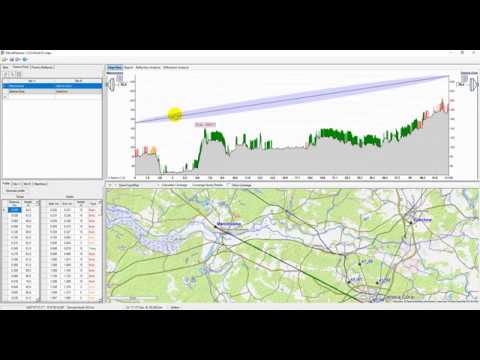
So, on the Point-to-point tab, select a hop, then go to the Profile tab and click Generate
profile.
You should specify the average building floor height in this window; it is typically 3 m.
That is because an OpenStreetMap project database usually contains information about the number
of floors of the buildings rather than its height in meters.
Therefore, building height in the path profile will be based on the number of floors and
floor height.
You will also have to specify the height of the buildings for which OSM project database
does not have information.
Such buildings will be highlighted in red in the path profile.
The user also can override the forest height information obtained from the Global Forest
Change records and set a new value to be used in a path profile.
Click OK, and after a couple of seconds, the information about terrain elevation and clutter
characteristics along the path profile will appear in the table cells.
The view of the path profile will be displayed at the top right of the panel.
Clutter: green: it is trees;
orange it is buildings whose height or number of floors found in the OpenStreetMap database;
red it is buildings whose height and a number of floors are missing in the OpenStreetMap
database.
MLinkPlanner 1.1 Microwave planning software MLinkPlanner 1.2 Point-to-Point and Point-to-Multipoint Microwave Link Planning Software How to Create a Property Map with Google Maps A 12-year-old app developer | Thomas Suarez Excel Formula Basics: How to use the SUM, COUNT, AVERAGE formulas to set up summary tables How to use Meta Tags to Rank Your Site on Page 1 of Search Engines How to create Data Entry Form in Excel - Ms Office? How to Edit a Path Profile in MLinkPlanner 1.2 how to create a Knowledge graph - Google Photoshop Text on a Circular Path
Facebook
Twitter
Google Plus
Latest Posts